Notebook LLM: Google's AI Research Assistant That's Changing How We Work with Documents
Notebook LLM: Google's AI Research Assistant That's Changing How We Work with Documents
The way we interact with information is undergoing a fundamental shift. For decades, we've been trained to search, read, and synthesize — a linear, time-consuming process that often leaves us drowning in open browser tabs and scattered notes. Enter Notebook LLM, Google's experimental AI tool that transforms static documents into dynamic, conversational knowledge bases.
What started as a quiet release from Google Labs has rapidly evolved into one of the most practical AI applications for knowledge workers, researchers, and businesses. Unlike general-purpose chatbots that pull from vast training data, Notebook LLM grounds its responses in your specific documents, creating a private, focused AI assistant that actually understands your materials.
But what exactly makes Notebook LLM different from simply uploading documents to ChatGPT or Claude? And how can businesses leverage this tool for real competitive advantage? Let's dive deep into what might be the most underrated AI productivity tool of 2026.
What Is Notebook LLM?
Notebook LLM is Google's AI-powered research and note-taking platform that allows users to upload documents and engage in conversations about their content. Think of it as having a research assistant who has read every document you've provided and can answer questions, draw connections, and help synthesize information — without hallucinating facts from outside sources.
The "grounding" concept is crucial here. When you upload documents to Notebook LLM, the AI doesn't just "know about" similar topics from its training data. It specifically references and works with the exact text you've provided. This means if you upload your company's Q3 financial report, Notebook LLM will answer questions using only that report — not general knowledge about your industry or similar companies.
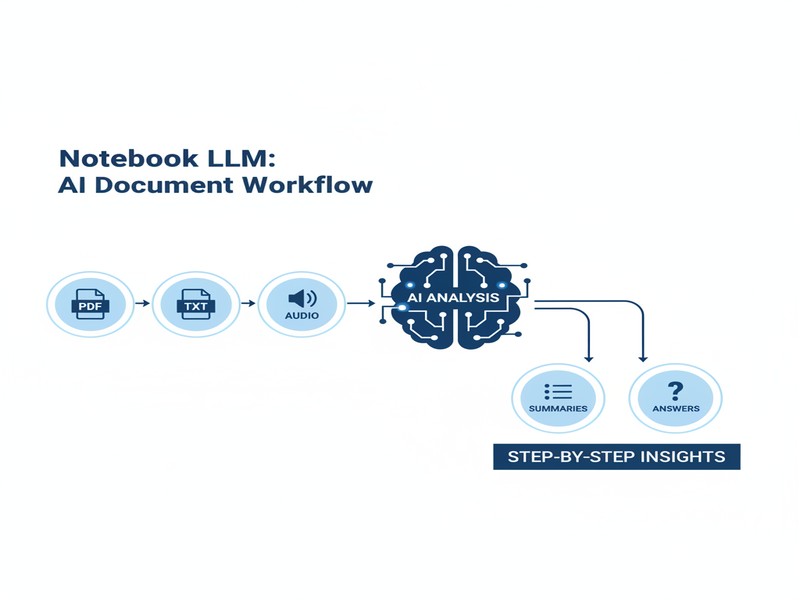
The platform accepts various document formats including PDFs, Google Docs, TXT files, and even copied text. You can create multiple "notebooks," each focused on different projects or topics, keeping your research organized and context-specific.
Key Features That Set It Apart
1. Source-Based Grounding
The standout feature of Notebook LLM is its strict adherence to uploaded sources. Every response includes citations that link directly to specific passages in your documents. This isn't just a nice-to-have feature — it's transformative for research integrity and fact-checking.
When you ask a question, Notebook LLM highlights exactly where in your documents it found the answer. This means you can verify claims instantly and maintain confidence in your research outputs. For businesses dealing with compliance, legal documents, or sensitive information, this traceability is invaluable.
2. Audio Overviews
Perhaps the most innovative feature is the ability to generate podcast-style audio summaries of your documents. Notebook LLM can create a conversational discussion between two AI hosts who summarize and analyze your materials.
This is perfect for:
- Commuting while staying updated on industry reports
- Reviewing meeting transcripts during workouts
- Consuming dense research papers without reading every page
- Sharing insights with team members who prefer audio learning
The audio quality has improved dramatically since launch, with natural-sounding conversations that don't feel robotic or repetitive.
3. Multi-Document Analysis
Notebook LLM excels at finding connections across multiple documents. Upload a year's worth of meeting notes, and it can identify recurring themes, track project evolution, or spot decisions that were made but not documented.
For businesses, this means:
- Identifying patterns in customer feedback across months
- Tracking how product requirements evolved
- Finding relevant precedents in legal or compliance documents
- Synthesizing market research from multiple sources
4. Interactive Note-Taking
The platform includes a built-in note-taking system that works seamlessly with the AI chat. You can save important insights, quotes, or summaries as you explore your documents. These notes become part of your notebook's context, allowing the AI to reference them in future conversations.
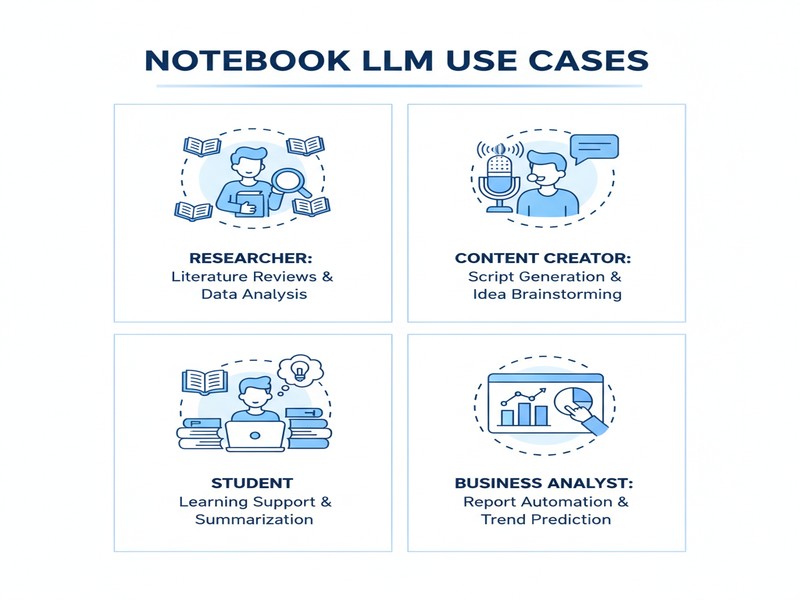
This creates a compounding effect — the more you use Notebook LLM, the more valuable it becomes as it builds a layered understanding of your research and insights.
Real-World Business Applications
Market Research and Competitive Analysis
Upload competitor whitepapers, industry reports, and market analysis documents. Notebook LLM can quickly identify:
- Competitor positioning and messaging strategies
- Market gaps and opportunities
- Technology trends across multiple sources
- Pricing strategies and business models
Instead of manually scanning dozens of reports, you can ask direct questions like "What are the top three themes across these five industry reports?" or "How does Company X's approach differ from Company Y's?"
Legal and Compliance Review
Law firms and compliance teams are finding Notebook LLM invaluable for:
- Rapid contract analysis and comparison
- Regulatory document review
- Case law research organization
- Due diligence document processing
The source citations ensure every claim can be traced back to specific contract clauses or regulatory text, maintaining the audit trails essential for legal work.
Product Management and Strategy
Product teams can use Notebook LLM to:
- Synthesize user research interviews
- Analyze feature request patterns
- Review competitive product documentation
- Track product evolution through version histories
By uploading customer feedback, support tickets, and product specs, teams can ask questions like "What are the most requested features we haven't implemented?" or "What pain points appear across different user segments?"
Content Strategy and SEO
Content marketers are leveraging Notebook LLM for:
- Analyzing top-performing competitor content
- Identifying content gaps in existing materials
- Summarizing lengthy research for blog posts
- Generating content briefs from multiple sources
The ability to upload and analyze SERP results, competitor blogs, and industry research makes content strategy development significantly faster.
Getting Started: A Practical Guide
Step 1: Create Your First Notebook
Navigate to notebooklm.google.com and sign in with your Google account. Click "New Notebook" and give it a descriptive name based on your project or research topic.
Step 2: Upload Your Documents
Click the "+" button to add sources. You can:
- Upload PDFs, Word docs, or TXT files
- Import Google Docs directly
- Paste copied text from any source
- Add web URLs (though this feature is more limited)
Pro tip: Start with 3-5 high-quality documents rather than dumping everything you have. Notebook LLM works best with focused, relevant materials.
Step 3: Start the Conversation
Once your documents are processed (this usually takes seconds), you can start asking questions. Begin with broad queries to understand the scope:
- "What are the main topics covered in these documents?"
- "Summarize the key findings from this research"
- "What are the differences between Document A and Document B?"
Step 4: Explore with Follow-Up Questions
The real power emerges in follow-up questions. If Notebook LLM mentions a concept, ask for clarification. If it cites a statistic, ask for context. The conversational nature means you can drill down into specifics without losing the broader context.
Step 5: Export and Share
Use the note-taking features to capture insights, then export your findings or share the notebook with team members. The audio overview feature is particularly useful for sharing with executives or stakeholders who prefer listening over reading.
Pro Tips for Maximum Value
Document Selection Matters
The quality of Notebook LLM's responses depends entirely on your source documents. Prioritize:
- Primary sources over summaries
- Recent documents for current relevance
- Diverse perspectives for balanced analysis
- Well-structured documents (the AI struggles with heavily formatted PDFs)
Ask Better Questions
The way you phrase questions significantly impacts results:
- ❌ "Tell me about this topic"
- ✅ "What does Document X say about topic Y, and how does it compare to Document Z's perspective?"
Specific, comparative questions yield more actionable insights than open-ended prompts.
Combine with Other Tools
Notebook LLM isn't a replacement for your entire workflow — it's a powerful component. Consider integrating it with:
- Notion or Obsidian for long-term knowledge management
- Zotero for academic research organization
- Airtable for structured data extraction
- vCX (shameless plug!) for sharing insights with your team
Privacy and Security Considerations
While Google states that Notebook LLM doesn't train on your uploaded documents, always consider:
- Don't upload highly sensitive personal information
- Review your organization's AI usage policies
- Be cautious with documents containing trade secrets
- Remember that while private, data is stored on Google's servers
Notebook LLM vs. The Competition
Compared to ChatGPT with File Upload
ChatGPT's file upload feature offers similar document analysis, but Notebook LLM has advantages:
- Better source citations — ChatGPT often paraphrases without specific references
- Persistent notebooks — Your documents and conversations are organized by project
- Audio summaries — ChatGPT doesn't offer podcast-style audio generation
- Focused grounding — Notebook LLM is less likely to mix in outside knowledge
ChatGPT wins on general conversation and creativity tasks, but Notebook LLM takes the crown for research-specific workflows.
Compared to Claude with Projects
Claude's Projects feature offers excellent context management and document analysis. The trade-offs:
- Claude advantage: Superior reasoning and longer context windows
- Notebook LLM advantage: Source citations, audio summaries, and better organization for research
For deep analytical work, Claude might be preferred. For research synthesis and presentation, Notebook LLM has the edge.
Compared to Perplexity
Perplexity excels at web search and real-time information. Notebook LLM focuses on your private documents. They're complementary tools — use Perplexity for discovering new information, Notebook LLM for analyzing what you already have.
Limitations to Keep in Mind
No tool is perfect, and Notebook LLM has constraints:
- Document limits: Each notebook has source limits (currently around 50 sources)
- Format restrictions: Complex tables, charts, and images in PDFs may not be fully parsed
- No internet access: It only knows what's in your uploaded documents
- English-focused: While improving, non-English document support is limited
- No collaborative editing: Notebooks are individual; true team collaboration features are minimal
The Future of Document Intelligence
Notebook LLM represents a larger shift in how we'll interact with information. The trend is clear: static documents are becoming dynamic knowledge bases. The ability to have a conversation with your research, get cited answers, and even listen to summaries is just the beginning.
For businesses, this means research cycles that previously took weeks can be compressed into days. Market analysis that required teams of analysts can now be initiated by individuals. The barrier to extracting insights from document collections is dropping dramatically.
As these tools evolve, expect to see:
- Real-time collaboration features
- Better integration with enterprise document management systems
- Advanced data visualization from document content
- Automated insight detection across document collections
Work With Versalence
At Versalence AI, we help businesses integrate cutting-edge AI tools like Notebook LLM into their workflows for maximum impact. Whether you need custom automation to process documents at scale, integration with your existing knowledge management systems, or training for your team on effective AI research methods, we bring the expertise to make it happen. Our approach combines the best tools — from OpenClaw agents to workflow automation with n8n — creating solutions that fit your specific needs rather than forcing one-size-fits-all platforms.
📧 versalence.ai/contact.html | sales@versalence.ai