New Vcx Integrations: A Deep Dive for Tuesday
Introduction - Hook with real problem
It's January 2026. Maria, VP of Customer Support at "GrowFast SaaS," is staring at her Q1 OKRs with a sinking feeling. Customer churn is creeping up. Agent satisfaction is plummeting. And despite investing heavily in a cutting-edge VCx platform (Versalence, naturally!), the promise of seamless, AI-powered customer experiences remains largely unfulfilled. The problem? The shiny new VCx platform is sitting in a silo, disconnected from critical sales data, product insights, and marketing campaign performance. Maria knows that the key to unlocking the platform's true potential lies in effective integrations, but navigating the crowded marketplace of VCx integrations in 2026 feels like wading through treacle. Which integrations actually deliver ROI? Which are just hype? And how can GrowFast SaaS ensure these integrations not only work but also drive measurable improvements in customer satisfaction and revenue? This post aims to answer those crucial questions, providing a practical guide to VCx integrations that truly work in 2026.
The Current Landscape - What's happening in 2026
The VCx landscape in 2026 is characterized by increased specialization and the rise of AI-powered orchestration. We’ve moved beyond simple API connections to sophisticated platforms that leverage AI to intelligently route interactions, personalize experiences, and automate complex workflows. The key trends shaping VCx integrations include:
- Hyper-Personalization: Customers expect highly personalized experiences. Integrations that leverage CRM data, behavioral analytics, and AI-driven recommendations are crucial.
- AI-Driven Automation: Automating repetitive tasks, such as ticket classification, sentiment analysis, and knowledge base retrieval, frees up agents to focus on complex issues.
- Omnichannel Orchestration: Seamlessly managing interactions across all channels (voice, chat, email, social media) requires robust integrations that provide a unified view of the customer journey.
- Proactive Engagement: Identifying and addressing customer needs before they escalate into problems requires integrations with predictive analytics and customer health monitoring tools.
- Low-Code/No-Code Platforms: The rise of low-code/no-code platforms has democratized integration development, allowing businesses to quickly connect disparate systems without extensive coding.
However, the biggest challenge remains: data silos. Many organizations still struggle to break down these silos and create a unified view of the customer. Effective VCx integrations are essential for bridging these gaps.
Deep Dive: Core Concepts - Frameworks and analysis
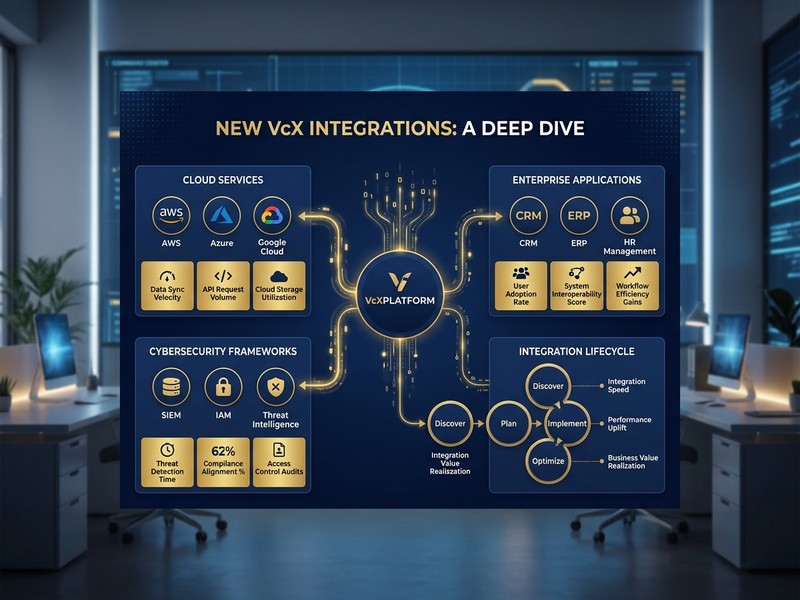
Before diving into specific integrations, it's crucial to understand the underlying framework. We can categorize VCx integrations into four core areas:
- Data Enrichment: Integrations that enrich customer profiles with data from various sources (CRM, marketing automation, product analytics). This allows agents to provide more personalized and informed support.
- Workflow Automation: Integrations that automate tasks and streamline workflows, such as ticket routing, escalation, and knowledge base search.
- Channel Unification: Integrations that consolidate interactions from multiple channels into a single interface, providing a unified view of the customer journey.
- AI-Powered Insights: Integrations that leverage AI to analyze customer interactions, identify patterns, and provide actionable insights to improve customer satisfaction and agent performance.
A key concept to consider is the "Integration Maturity Model." This model helps organizations assess their current integration capabilities and identify areas for improvement:
- Level 1: Ad-hoc Integrations: Point-to-point integrations with limited automation and data sharing.
- Level 2: Standardized Integrations: Standardized APIs and data formats, enabling more consistent and reliable integrations.
- Level 3: Orchestrated Integrations: AI-powered orchestration platforms that intelligently route interactions and automate complex workflows.
- Level 4: Predictive Integrations: Predictive analytics and machine learning to anticipate customer needs and proactively address issues.
GrowFast SaaS, for example, might currently be at Level 2, aiming to reach Level 3 by the end of 2026.
Comparison and Trade-offs - Tables with pros/cons
Here are some critical integrations to consider in 2026, along with their pros and cons:
Table 1: CRM Integrations
| Integration Type | Description | Pros | Cons | Use Case |
|---|---|---|---|---|
| Native CRM Integration (e.g., Salesforce, Dynamics 365) | Direct integration with your CRM system | Seamless data synchronization, unified view of the customer, automated workflows | Can be expensive, requires careful configuration, potential for data security risks | Providing personalized support, tracking customer interactions, managing sales opportunities |
| Data Enrichment Platform (e.g., Clearbit, ZoomInfo) | Enriches customer profiles with data from various sources | Improved data quality, more personalized support, better lead scoring | Can be expensive, data accuracy can vary, potential for privacy concerns | Identifying high-value customers, personalizing marketing campaigns, improving sales outreach |
| Customer Data Platform (CDP) (e.g., Segment, mParticle) | Centralized platform for collecting and managing customer data from multiple sources | Unified customer view, improved data governance, enhanced personalization | Can be complex to implement, requires significant investment, potential for data silos if not properly managed | Building a 360-degree view of the customer, personalizing experiences across all channels, improving marketing ROI |
Table 2: AI-Powered Integrations
| Integration Type | Description | Pros | Cons | Use Case |
|---|---|---|---|---|
| Sentiment Analysis (e.g., MonkeyLearn, MeaningCloud) | Analyzes customer sentiment in real-time | Identifies unhappy customers, prioritizes urgent issues, improves agent empathy | Can be inaccurate, requires training data, potential for bias | Monitoring customer satisfaction, identifying potential churn risks, improving agent training |
| Knowledge Base Integration (e.g., Guru, Notion) | Integrates with your knowledge base to provide agents with quick access to information | Reduces agent handling time, improves first contact resolution, empowers self-service | Requires a well-maintained knowledge base, can be difficult to keep up-to-date, potential for inaccurate information | Answering common customer questions, resolving technical issues, providing product information |
| AI-Powered Chatbots (e.g., Dialogflow, Rasa) | Automates customer interactions through AI-powered chatbots | Reduces agent workload, provides 24/7 support, improves customer satisfaction | Can be impersonal, requires careful training, potential for errors | Answering simple questions, routing customers to the right agent, providing basic support |
Implementation Framework - Step-by-step guide
Implementing VCx integrations effectively requires a structured approach. Here's a step-by-step guide:
- Define Your Goals: Clearly define what you want to achieve with VCx integrations. Do you want to reduce churn, improve agent satisfaction, or increase revenue?
- Assess Your Current State: Evaluate your existing VCx platform, data sources, and integration capabilities. Identify any gaps or limitations.
- Prioritize Integrations: Based on your goals and current state, prioritize the integrations that will have the biggest impact.
- Develop an Integration Strategy: Outline your integration approach, including the technologies you will use, the data you will integrate, and the workflows you will automate.
- Choose the Right Integration Tools: Select the integration tools that best meet your needs. Consider factors such as cost, scalability, and ease of use.
- Implement the Integrations: Implement the integrations according to your integration strategy. Start with a pilot project to test the integrations and identify any issues.
- Monitor and Optimize: Continuously monitor the performance of your integrations and optimize them to achieve your goals.
Specific Implementation Advice:
- Use API Management Platforms: Platforms like Kong or Apigee can help you manage and secure your APIs, ensuring that your integrations are reliable and scalable.
- Implement Data Governance Policies: Establish clear data governance policies to ensure that your data is accurate, consistent, and secure.
- Invest in Training: Train your agents and other stakeholders on how to use the new integrations.
- Automate Testing: Implement automated testing to ensure that your integrations are working correctly.
Decision Guide - How to choose
Choosing the right VCx integrations requires careful consideration of your business needs, technical capabilities, and budget. Here's a decision framework to guide your selection:
- Business Needs: What are your most pressing business challenges? Which integrations will have the biggest impact on addressing these challenges?
- Technical Capabilities: Do you have the technical expertise to implement and maintain the integrations? Do you need to hire additional staff or outsource the work?
- Budget: How much are you willing to spend on VCx integrations? Consider both the upfront costs and the ongoing maintenance costs.
- Scalability: Can the integrations scale to meet your growing business needs?
- Security: Are the integrations secure? Do they comply with all relevant regulations?
- Vendor Reputation: What is the vendor's reputation? Do they have a proven track record of success?
- Integration Complexity: How complex are the integrations to implement? Do they require extensive coding or configuration?
Decision Framework:
| Criteria | High Priority | Medium Priority | Low Priority |
|---|---|---|---|
| Impact on Business Goals | Integrations that directly address your most pressing business challenges | Integrations that indirectly support your business goals | Integrations that have little impact on your business goals |
| Technical Feasibility | Integrations that are easy to implement and maintain with your existing technical capabilities | Integrations that require some additional technical expertise | Integrations that are technically challenging to implement |
| Cost-Effectiveness | Integrations that provide a high return on investment | Integrations that provide a moderate return on investment | Integrations that provide a low return on investment |
Case Study or Real Example
Let's revisit GrowFast SaaS. After conducting a thorough assessment, Maria identified that churn was primarily driven by slow response times and lack of personalized support. Therefore, she prioritized two key integrations:
- Salesforce Integration: This provided agents with a complete view of the customer's purchase history, support tickets, and marketing interactions. This allowed them to provide more personalized and informed support.
- Sentiment Analysis Integration: This allowed agents to identify unhappy customers in real-time and prioritize their issues. This helped to reduce churn and improve customer satisfaction.
The results were significant. Within three months, GrowFast SaaS saw a 15% reduction in customer churn and a 20% improvement in agent satisfaction. The key was focusing on integrations that directly addressed their most pressing business challenges and providing agents with the tools they needed to succeed.
30-Day Action Checklist
Here's a practical checklist to get started with VCx integrations:
Week 1: Planning and Assessment
- [ ] Define your business goals for VCx integrations.
- [ ] Assess your current VCx platform and integration capabilities.
- [ ] Identify key data sources and systems to integrate.
- [ ] Research potential integration tools and vendors.
Week 2: Strategy and Prioritization
- [ ] Develop an integration strategy.
- [ ] Prioritize integrations based on business impact and feasibility.
- [ ] Define key performance indicators (KPIs) to measure success.
- [ ] Create a budget for VCx integrations.
Week 3: Implementation and Testing
- [ ] Implement the highest-priority integrations.
- [ ] Conduct thorough testing to ensure integrations are working correctly.
- [ ] Train agents and other stakeholders on how to use the new integrations.
- [ ] Document integration processes and workflows.
Week 4: Monitoring and Optimization
- [ ] Monitor the performance of your integrations.
- [ ] Analyze data and identify areas for improvement.
- [ ] Optimize integrations to achieve your goals.
- [ ] Iterate and refine your integration strategy based on results.
Bottom Line - Key takeaways
VCx integrations are essential for unlocking the full potential of your customer experience platform. In 2026, the focus is on hyper-personalization, AI-driven automation, and omnichannel orchestration. By following a structured approach, prioritizing integrations based on business impact, and continuously monitoring and optimizing performance, you can drive significant improvements in customer satisfaction, agent productivity, and revenue. The key is not just having integrations, but having the right integrations, implemented strategically and managed effectively.
Work With Versalence - CTA paragraph
Ready to transform your customer experience with cutting-edge VCx integrations? Versalence specializes in building and implementing AI-powered integration solutions that seamlessly connect your systems and unlock the power of your customer data. We work closely with businesses like yours to understand your unique challenges and develop customized integration strategies that deliver measurable results. Contact us today to learn how Versalence can help you achieve your customer experience goals.
📧 versalence.ai/contact.html | sales@versalence.ai