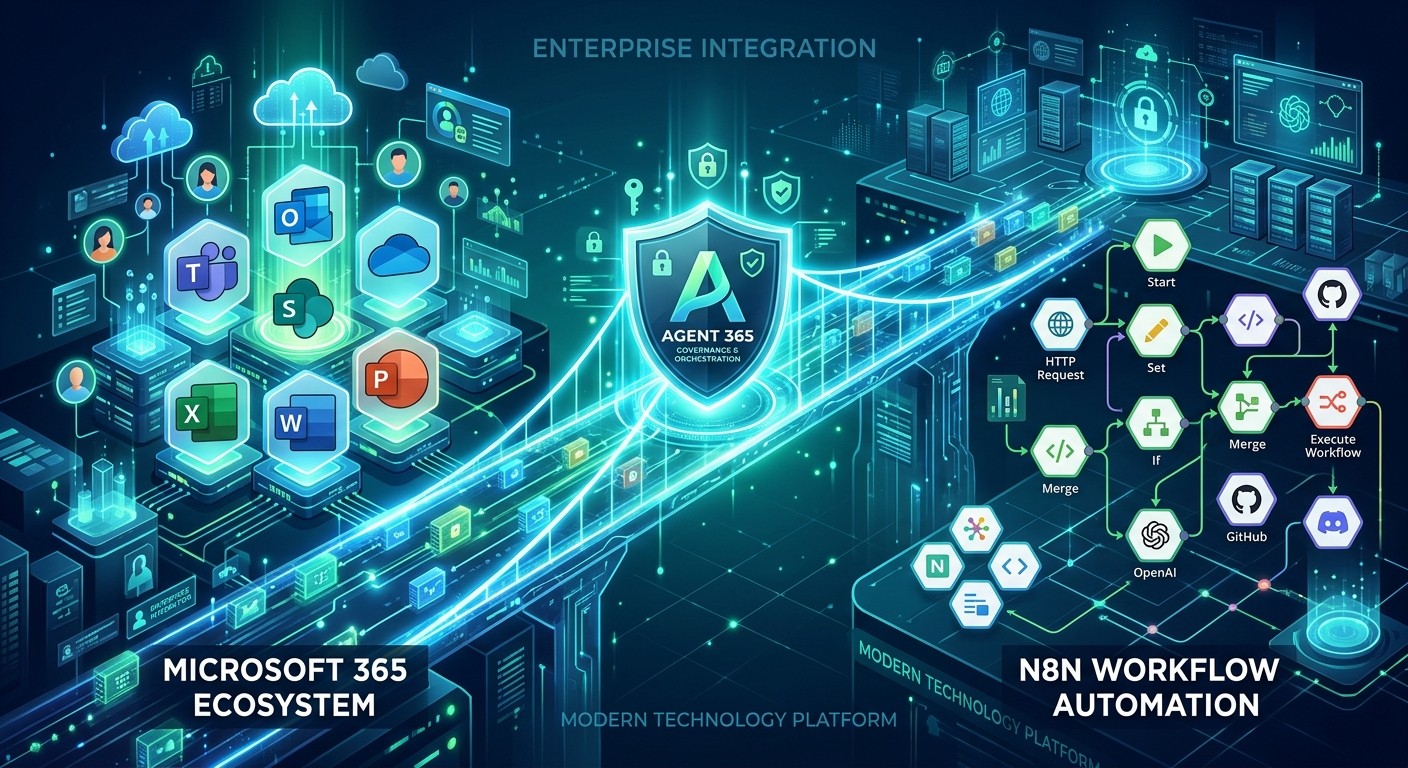
Microsoft Agent 365 Integration: Why N8N Just Became the Smartest Choice for Microsoft-First Companies
Microsoft Agent 365 Integration: Why N8N Just Became the Smartest Choice for Microsoft-First Companies
For years, organizations deeply invested in Microsoft 365 faced a frustrating dilemma: they loved the flexibility and power of N8N for workflow automation, but they worried about governance, identity, and security. N8N lived outside the Microsoft perimeter. IT teams could not audit it. Compliance officers could not enforce data policies on it. And when users asked, "Why not just use Power Automate?" — the honest answer was usually: because N8N does things Power Automate cannot.
That just changed. Microsoft has announced Agent 365 — a unified control plane for enterprise AI agents — and it comes with native N8N integration. For the first time, N8N workflows can be registered inside your Microsoft tenant, operate with corporate Entra ID identity, and live under the same governance umbrella as SharePoint, Teams, and Outlook.
This is not a minor update. This is the bridge that makes N8N viable — and possibly preferable — for companies that run on Microsoft.
What Is Microsoft Agent 365?
Agent 365 is Microsoft's answer to a problem that has grown as fast as AI adoption: how do you manage dozens (or hundreds) of AI agents across your organization without losing control? Every department is spinning up chatbots, automation workflows, and AI assistants. Some live in Copilot Studio. Some live in third-party platforms. Some were built by developers. Some were built by citizen developers who clicked "publish" on a Friday afternoon.
Agent 365 creates a single control plane where IT administrators can:
- Register all agents, regardless of where they were built
- Assign corporate identity via Microsoft Entra ID
- Enforce permissions and data access policies
- Audit agent activity and conversation transcripts
- Disable or revoke agents that violate policy
Think of it as the Active Directory of AI agents. Just as Active Directory turned a mess of individual user accounts into a manageable directory, Agent 365 aims to do the same for AI agents.
The N8N Integration: What It Actually Means
The integration works through a Microsoft Agent 365 node in N8N. Here is what that unlocks:
Corporate Identity for N8N Workflows
When you register an N8N workflow as an Agent 365 agent, it receives a corporate identity within your Microsoft tenant. It is no longer an external automation tool hitting Microsoft APIs with OAuth tokens. It is an internal agent, recognized by Entra ID, subject to conditional access policies, and visible in the same admin dashboards where you manage Teams apps and SharePoint permissions.
This means your N8N workflows can:
- Access SharePoint, OneDrive, and Outlook as authenticated corporate users
- Respect sensitivity labels and data loss prevention (DLP) policies
- Appear in audit logs alongside native Microsoft tools
- Be disabled by IT if they misbehave — just like any internal application
Native Deployment Inside Microsoft Apps
Registered N8N agents can operate inside the Microsoft 365 applications where your users already work:
- Microsoft Teams — Agents can post adaptive cards, respond to channel messages, and trigger workflows from chat commands
- Outlook — Agents can read emails, draft responses, schedule meetings, and process calendar events
- Word and Excel — Agents can insert content, analyze spreadsheets, and generate reports
- SharePoint — Agents can manage documents, update lists, and route approvals
This is the missing piece. Before Agent 365, an N8N workflow that needed to update a SharePoint list was an external script making API calls. Now it is an internal agent operating with user context and corporate permissions.
Governance Without Sacrificing Flexibility
The magic here is that N8N does not become Power Automate. It keeps its 1,200+ integrations, its custom JavaScript nodes, its self-hosting option, and its visual workflow builder. But now it also inherits Microsoft's enterprise governance:
- Entra ID authentication and SSO
- Microsoft Purview DLP policies
- Role-based access controls via Power Platform Admin Center
- Audit logs and compliance transcripts
You get the best of both worlds: N8N's automation depth with Microsoft's security perimeter.
Official Microsoft Nodes in N8N (Built-in)
While Agent 365 is the headline news, it is worth remembering that N8N already ships with robust native nodes for the Microsoft ecosystem. These are not community hacks. These are official nodes maintained by the N8N team, using Microsoft Graph API and standard OAuth2 authentication.
Microsoft Teams Node
The Teams node is one of the most powerful tools for real-time business automation. It supports:
Triggers:
- New channel message — Start a workflow the moment a message is posted
- New chat message — Trigger on direct messages or group chats
- New team member — Automate onboarding when someone joins a team
Actions:
- Send channel message — Post alerts, summaries, and updates
- Create channel — Auto-create project channels when deals close
- Send and wait for response — Build interactive approval workflows with adaptive cards
Use case: A high-priority Jira ticket triggers an N8N workflow that posts an adaptive card to the #incidents Teams channel, waits for a manager to click "Approve" or "Deny," and then routes the ticket accordingly.
Microsoft Outlook Node
The Outlook node handles the communication layer:
Triggers:
- New email received — Start workflows from incoming messages
- New calendar event — Trigger on meeting creation
Actions:
- Send email — Automated notifications, reports, and follow-ups
- Create event — Schedule meetings from CRM triggers
- Get messages — Search and process email threads
- Create contact — Auto-add leads from form submissions
Use case: A customer support email arrives. N8N reads it, classifies the intent with an AI node, creates a Zendesk ticket, and sends a personalized acknowledgment from the support team's shared mailbox.
Microsoft OneDrive Node
For document-centric workflows:
Actions:
- Upload file — Store generated reports, invoices, or exports
- Download file — Retrieve documents for processing
- Create folder — Organize files by project or client
- Search files — Find documents by name or metadata
Use case: An N8N workflow generates a monthly sales report as a PDF, uploads it to a shared OneDrive folder, and posts a link to the #sales Teams channel.
Microsoft SharePoint Node
The SharePoint node connects to Microsoft's collaboration backbone:
Actions:
- Get list items — Read data from SharePoint lists
- Create list item — Add records from external sources
- Update list item — Sync CRM data back to SharePoint
- Upload file to library — Store documents with metadata
Use case: A new employee is added in your HRIS system. N8N creates a SharePoint list entry, provisions a OneDrive folder, sends a welcome email, and creates a Teams channel for the onboarding cohort.
Microsoft Excel Node
For spreadsheet automation without the spreadsheet nightmares:
Actions:
- Read rows — Extract data for reporting or analysis
- Append rows — Log data from IoT devices or form submissions
- Update rows — Sync status changes from project management tools
Use case: A manufacturing workflow reads sensor data every hour, appends it to an Excel workbook stored in SharePoint, and alerts the quality team via Teams if any metric exceeds thresholds.
The Microsoft 365 Copilot Community Node
Before Agent 365, a community developer built n8n-nodes-microsoft365-copilot — a node that lets you send messages to Microsoft 365 Copilot and receive AI-generated responses inside your workflows.
What it does:
- Create Copilot conversations programmatically
- Send prompts and receive text responses
- Enable web search grounding per message
- Add custom context for more relevant answers
Important caveats:
- Uses Microsoft Graph Beta API — subject to change, not for production
- Text only — no file creation, email sending, or meeting scheduling
- Requires M365 Copilot license per user
- Only organizational accounts — no personal Microsoft accounts
- Delegated permissions only — always operates in authenticated user context
This node is useful for experimentation and internal proof-of-concepts, but the real production play is Agent 365 integration, which will eventually supersede the need for standalone Copilot API calls.
Bottom Line for Pro-Microsoft Clients
Here is the reality for companies that live inside Microsoft 365:
Power Automate Is Not Going Anywhere
Microsoft's own automation tool, Power Automate, remains the default choice for organizations that want everything under one vendor. It is deeply integrated, governed by default, and requires no additional security conversations. For simple workflows inside SharePoint, Teams, and Outlook, Power Automate is often the faster path.
But Power Automate has limits. It struggles with complex branching logic, external API integrations outside the Microsoft ecosystem, and custom JavaScript transformations. Its RPA capabilities are improving, but they are not as flexible as a full code environment.
N8N Just Became Enterprise-Viable for Microsoft Shops
Before Agent 365, the objection to N8N in Microsoft-first companies was always governance. Now that objection is gone. N8N workflows can:
- Live inside your Microsoft security perimeter
- Use Entra ID identity and conditional access
- Respect Purview DLP and sensitivity labels
- Be audited, disabled, and managed by IT
This means you can now recommend N8N for:
- Complex multi-system workflows that touch Microsoft and non-Microsoft tools
- Custom API integrations that Power Automate cannot handle
- Self-hosted deployments where data sovereignty matters
- Developer-friendly environments where JavaScript and custom logic are required
The Hybrid Strategy Makes Sense
The smartest approach for most Microsoft-heavy organizations is a hybrid strategy:
- Power Automate for simple, internal, Microsoft-only workflows
- Copilot Studio for conversational agents and chatbots inside Teams
- N8N for complex orchestration, external integrations, and custom logic — now governed via Agent 365
This is not about replacing Microsoft tools. It is about extending them with a platform that can do what they cannot, while keeping everything under the same governance umbrella.
Cost Considerations
- Power Automate: $15/user/month (personal) / $40/user/month (premium with AI Builder)
- N8N: $20/month (Starter, 2,500 executions) / $50/month (Pro, 10,000 executions)
- Microsoft 365 Copilot: Add-on license required for Copilot API access
- Agent 365: Expected to be included in existing Microsoft 365 governance tiers
For small teams doing heavy automation, N8N is often cheaper. For large organizations, the cost comparison depends on user count versus workflow execution volume.
What You Should Do Now
If you manage automation for a Microsoft-first organization, here is your action plan:
- Evaluate your current workflows — Identify which ones are stuck in Power Automate because of governance concerns, not capability limits
- Register for Agent 365 preview — Microsoft is rolling this out gradually; get your tenant on the list
- Audit your N8N credentials — Ensure your Microsoft Graph API credentials are using Entra ID OAuth2, not legacy methods
- Map governance requirements — Work with IT and compliance to define which N8N workflows should be registered as Agent 365 agents
- Plan a pilot — Pick one non-critical but visible workflow (e.g., Teams notifications from your CRM) and register it through Agent 365 to demonstrate the governance model
Final Word
Microsoft Agent 365 does not make N8N a Microsoft product. It does something more valuable: it makes N8N a governed citizen inside the Microsoft ecosystem. For years, the choice between N8N and Power Automate was a trade-off between flexibility and governance. That trade-off is disappearing.
For Microsoft-first companies, this is the moment to re-evaluate what is possible. The automation platform you wanted — with the security perimeter you need — is now available.
Work With Versalence
At Versalence, we build AI automation solutions that integrate seamlessly with your existing technology stack — whether that is Microsoft 365, Google Workspace, or a hybrid environment. If you are exploring Agent 365 integration or need help connecting N8N to your Microsoft ecosystem securely, our team can architect, implement, and govern the solution.
📧 Visit versalence.ai/contact.html
📧 Email us at sales@versalence.ai