How to Add a Custom AI Chatbot to Your Website Without Backend Setup
In today’s hyper-connected digital landscape, consumer expectations have reached an all-time high. When a potential customer or client lands on your website, they expect immediate, accurate, and personalized answers to their questions. Studies consistently show that if a user cannot find the information they need within a matter of seconds, they will simply leave and turn to a competitor. In fact, modern consumers expect a response to customer service inquiries in under five minutes.
For years, businesses attempted to solve this problem with traditional, rule-based chatbots. We all know the experience: clicking through rigid, pre-defined decision trees, only to be met with the dreaded, "I'm sorry, I didn't understand that. Would you like to speak to a human?" These legacy systems were frustrating for users and ultimately did more harm than good to a company's brand reputation.

The advent of Large Language Models (LLMs) like GPT-4, Claude, and Llama has fundamentally changed the paradigm. Generative AI chatbots can understand natural language, process complex multi-part queries, and draw upon vast internal knowledge bases to deliver human-like, contextually accurate responses. However, while the AI models themselves have become incredibly advanced, a massive friction point remains for most businesses: deployment.
Building a secure, responsive, and aesthetically pleasing chat interface, connecting it to an AI backend, managing conversation state, and securely routing API calls usually requires a full-stack development team. It means spinning up Node.js or Python servers, dealing with WebSocket connections, and writing hundreds of lines of frontend React or Vanilla Javascript.
But what if you could bypass the backend complexity entirely? What if you could deploy a cutting-edge LLM chatbot to any website using just a few lines of HTML?
In this article, we will examine how Versalence AI solves the chatbot integration gap. By utilizing low-code AI orchestrators like Flowise in tandem with our specialized open-source embed libraries, we help businesses deploy intelligent, customized AI chatbots in minutes rather than months.
The Business Impact: Why Frictionless AI Deployment Matters
Before examining the technical mechanics of frontend chatbot embedding, it is crucial to understand why rapid deployment architecture is a game-changer for modern businesses.
1. The High Cost of Custom Infrastructure
Traditionally, integrating an AI chatbot required significant capital expenditure. A company would need to hire frontend developers to build the chat UI, backend engineers to build the API gateway and manage LangChain scripts, and DevOps engineers to ensure the servers could handle scalable websocket traffic. This process easily takes weeks, if not months, and costs tens of thousands of dollars in development hours alone.
By utilizing an embeddable architecture, you eliminate the need for custom middleware and frontend builds. The chat interface is delivered as a lightweight, pre-packaged Javascript library that connects directly to a unified AI orchestration platform.
2. Agility and Iteration
In the world of AI, the ability to iterate rapidly is a distinct competitive advantage. Your chatbot’s prompt, its knowledge base (Vector Database), and its internal logic will need to be tweaked based on real user interactions. If your chat logic is hardcoded into a custom backend, every change requires a deployment cycle, code reviews, and potential downtime.
When you decouple the frontend chat interface from the backend AI logic via a simple Javascript embed, non-technical teams (like customer success or marketing) can update the AI's behavior on the backend orchestrator, and those changes are instantly reflected on the live website. No code deployment required.
3. Seamless Omnichannel Experiences
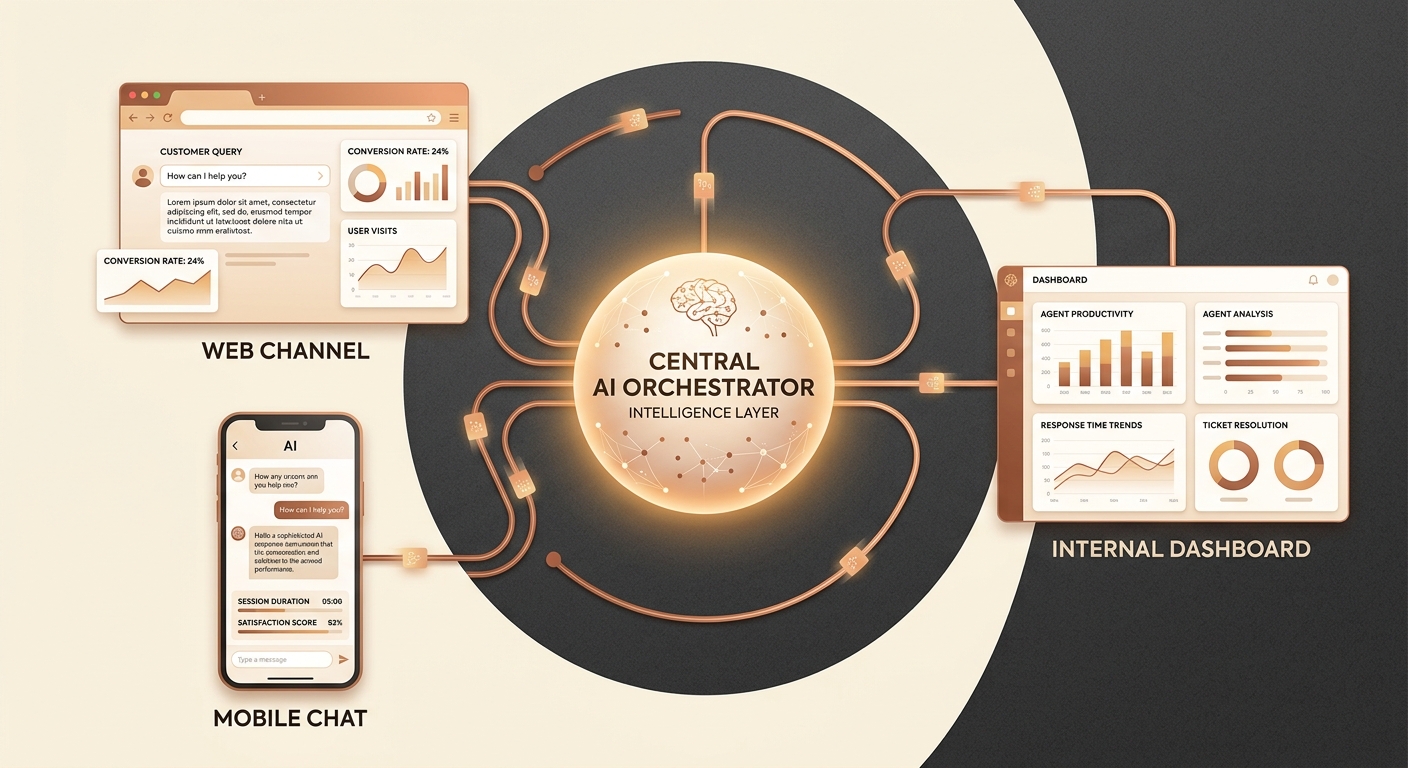
Website visitors are not your only customers. People interact with businesses via WhatsApp, internal company portals, and mobile applications. By standardizing how chat interfaces connect to your AI backend, you ensure a consistent brand experience across all touchpoints. A frictionless embed script guarantees that whether a user is on a dedicated landing page, a WordPress blog, or a custom web app, they get the exact same intelligent assistant.
How Versalence Delivers This Solution: The FlowiseChatEmbed Library
At Versalence AI, our mission is to make advanced AI automation accessible, scalable, and easy to deploy. We recognize that while building powerful AI logic is critical, the "last mile" of AI—delivering it to the end-user—is often where projects stall.
To solve this, we leverage the power of Flowise, an incredible low-code UI for LangChain and LlamaIndex that allows developers to build complex AI workflows using a drag-and-drop interface. But having a great Flowise workflow is only half the battle; you need to get that workflow onto your website.
That is why we maintain and utilize robust deployment tools like the FlowiseChatEmbed library (available via the Versalence AI GitHub repository at versalenceai/FlowiseChatEmbed). This open-source Javascript library is designed to display a Flowise chatbot on any website with minimal configuration.
Let's look at the technical architecture and how simple it is to implement.
The Technical Architecture
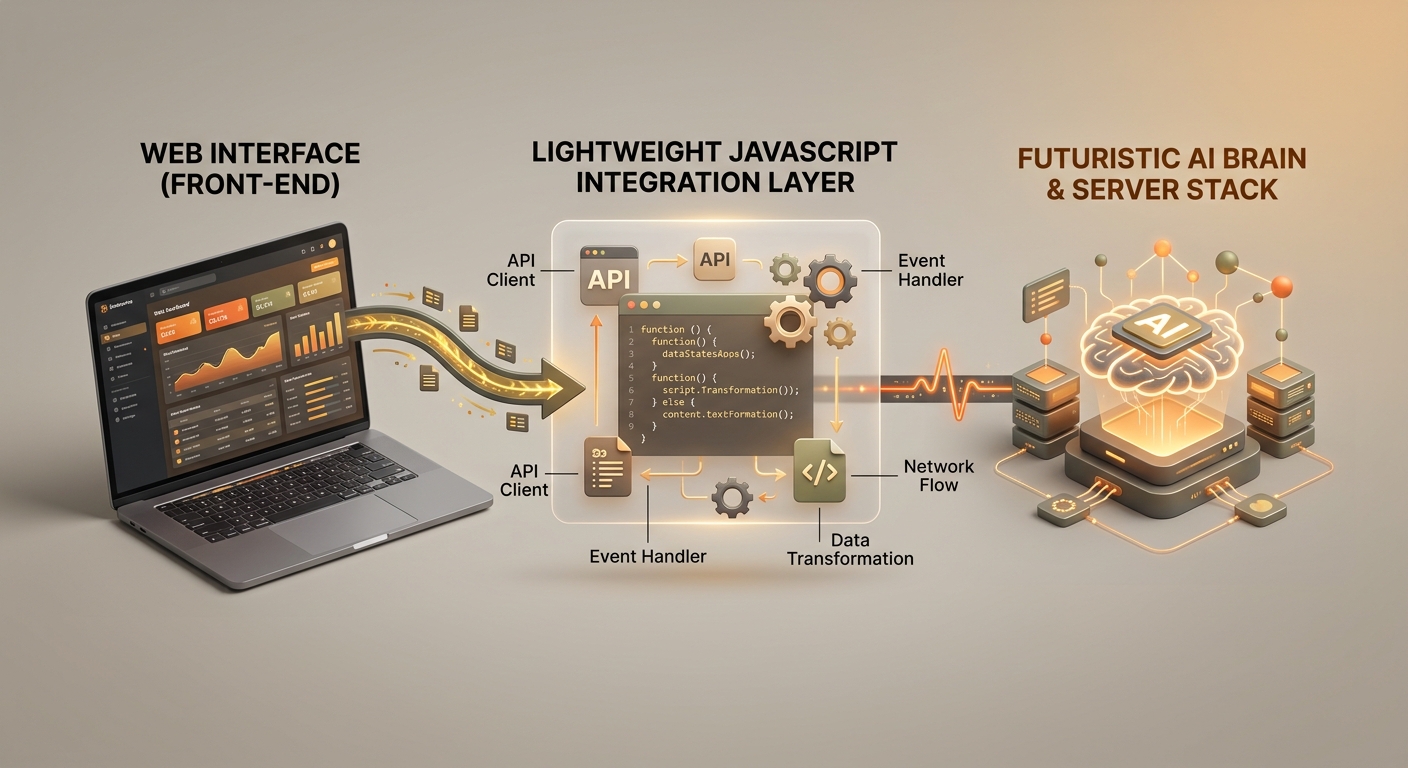
The architecture relies on decoupling the user interface from the AI processing engine.
- The Frontend: The user's browser runs a lightweight Javascript file (
web.js). This script handles the entire UI—the chat bubble, the message history display, loading animations, and user input fields. - The Bridge: When a user types a message, the JS library packages the text and a unique session ID, sending it via an HTTP/REST or WebSocket request directly to your securely hosted Flowise instance.
- The Backend (Flowise): Flowise receives the query via the designated
chatflowid. It then processes the text through your configured LangChain workflow (which might involve querying a Pinecone vector database for company documents, or running a tool to check inventory). - The Response: The LLM generates the answer, Flowise routes it back to the origin, and the embed library beautifully renders it on the user's screen.
Implementation: From Zero to Chat in Minutes
Installing and configuring the embed requires zero backend code. For developers looking to host the source code or contribute, the repository provides simple setup commands:
# Install dependencies
yarn install

# Run the development server
yarn dev
Running yarn dev spins up a local server on port 5678, allowing developers to test changes to the chat UI instantly.
However, for businesses that simply want to drop the chatbot onto their live website, the process is even easier. You can inject the script directly into your HTML utilizing a Content Delivery Network (CDN). The library supports two primary display modes: PopUp and FullPage.
1. The PopUp Embed
The most common use case is a floating chat bubble in the bottom right corner of a website. This allows users to browse your products or read your content while simultaneously chatting with your AI assistant.
To deploy this, you simply add the following script before the closing </body> tag of your website:
<script type="module">
  import Chatbot from 'https://cdn.jsdelivr.net/npm/flowise-embed/dist/web.js';
  Chatbot.init({
    chatflowid: 'YOUR_UNIQUE_CHATFLOW_ID',
    apiHost: 'https://your-secure-flowise-instance.com',
  });
</script>
In this snippet, chatflowid acts as the secure key that tells the script exactly which AI brain to talk to, and the apiHost points to the server where your AI is hosted. That is it. Two lines of configuration, and your website is now powered by Generative AI.

2. The FullPage Embed
Sometimes, you don't want a small popup. You might be building an internal knowledge base portal for your employees, or a dedicated customer support page where the chat is the primary interface (similar to the ChatGPT interface).
The library handles this natively with the initFull method:
<body style="margin: 0">
  <script type="module">
    import Chatbot from 'https://cdn.jsdelivr.net/npm/flowise-embed/dist/web.js';
    Chatbot.initFull({
      chatflowid: 'YOUR_UNIQUE_CHATFLOW_ID',
      apiHost: 'https://your-secure-flowise-instance.com',
      theme: {
        chatWindow: {
          // The library automatically scales to fill the screen
        },
      },
    });
  </script>
  <flowise-fullchatbot></flowise-fullchatbot>
</body>
By binding the script to the <flowise-fullchatbot> custom HTML element and removing the body margin, the chat interface takes over the entire viewport, providing a deeply immersive conversational experience without writing a single line of CSS.
Deep Customization and Theming
A common complaint with third-party chat widgets is that they look out of place. They feature the vendor's branding, clash with your website's color palette, and disrupt the user experience.
The FlowiseChatEmbed library was built with enterprise-grade customization in mind. Through the configuration object, you can pass a highly detailed theme parameter to perfectly match your brand guidelines.
While the basic setup takes seconds, developers can customize:
- Brand Colors: Adjust the primary color of the chat bubble, the user's message bubbles, and the AI's message bubbles to match your exact hex codes.
- Typography: Inject custom fonts to ensure the chat text matches the rest of your website's typography.
- Avatars and Icons: Replace default icons with your company logo, and set custom user avatars.
- Greeting Messages: Configure standard welcome messages (e.g., "Hi there! I'm the Versalence AI assistant. How can I help you automate your business today?") to guide the user's first interaction.
- Input Placeholders: Change the text inside the input box from a generic "Type your message..." to something contextually relevant like "Ask about our enterprise pricing..."
Because this configuration lives in the frontend script, marketing teams can easily request visual updates without needing to touch the backend AI deployment.
Best Practices for Deploying Website AI Chatbots
While the technical deployment of an embed script takes only a few minutes, ensuring that the chatbot delivers maximum business value requires strategic planning. Based on our experience building AI solutions for diverse industries, we recommend the following best practices when deploying your web chatbot:
1. Implement Retrieval-Augmented Generation (RAG)
An LLM out of the box only knows what it was trained on up to a certain date. It does not know your company's return policy, your specific SaaS pricing tiers, or the exact dimensions of your proprietary hardware.
Before embedding the chatbot on your site, use your orchestration layer to connect the AI to a Vector Database containing your business documents. This architecture—known as Retrieval-Augmented Generation (RAG)—ensures that when a user asks a specific question, the AI first searches your company documents for the exact answer, and then formulates a conversational response. This drastically reduces "hallucinations" (instances where the AI invents incorrect information).
2. Set Clear AI Guardrails
Your website chatbot is a representative of your brand. You must ensure it behaves appropriately. Through strict system prompts and orchestration logic, you should restrict the AI's domain of conversation. If you run a logistics company, the chatbot should politely decline to answer questions about political events or write code. By setting clear boundaries in the backend, the frontend embed will consistently deliver safe, brand-aligned interactions.
3. Provide a Human Fallback
AI is incredibly capable, but it is not infallible. There will always be complex, highly specific edge cases where a customer needs human empathy or manual intervention. Your AI chatbot workflow should always include a fallback mechanism. If the AI detects frustration in the user's tone, or if it fails to resolve the issue after a set number of turns, it should automatically offer to capture the user's email address or seamlessly route the chat history to a live human agent via platforms like Zendesk or Slack.
Related Solutions We've Built
At Versalence AI, the web embed is just one part of a comprehensive automation ecosystem. Solving the website chat problem often uncovers other areas where intelligent automation can drastically improve operational efficiency.
Because we build modular AI architectures, the exact same backend logic powering your website embed can be deployed across multiple channels. Some related solutions we frequently implement for our clients include:
- WhatsApp Business AI: We connect your AI knowledge base to the WhatsApp Business API. This allows customers in regions where WhatsApp is the primary communication tool to interact with your AI assistant seamlessly from their phones, complete with document handling and voice note transcription.
- Internal Employee Knowledge Portals: Using the FullPage embed feature, we build secure, SSO-gated internal portals where your employees can query an AI trained on HR manuals, technical documentation, and past Slack conversations. This effectively creates an omniscient internal helpdesk, saving hundreds of hours of internal support time.
- Automated Lead Qualification Pipelines: Instead of using the web embed purely for support, we configure the AI to act as a Sales Development Representative (SDR). The bot engages visitors, asks qualifying questions (e.g., company size, budget, specific pain points), and automatically pushes qualified lead data via webhooks directly into your CRM (like Salesforce or HubSpot), booking calendar appointments on autopilot.
Results & ROI: What to Expect
Transitioning from traditional customer interaction methods to an embedded, LLM-powered chatbot yields immediate and measurable returns on investment. When businesses implement solutions like the Flowise embed integrated with a robust AI backend, the outcomes are transformative.
Massive Reduction in Developer Costs and TTM
Building a custom full-stack chat application from scratch takes an average of 4 to 8 weeks and requires significant engineering budget. By utilizing our pre-built embed libraries and low-code orchestrators, Time-to-Market (TTM) is reduced to days or even hours. This allows companies to reallocate expensive engineering resources back to core product development rather than reinventing the wheel for a chat interface.
30% to 50% Deflection in L1 Support Tickets
Level 1 (L1) support queries—such as "Where is my order?", "How do I reset my password?", or "What are your business hours?"—make up the bulk of customer service volume. An intelligent RAG-powered chatbot embedded on your site can handle these repetitive inquiries with near-perfect accuracy, 24/7. Clients typically see a 30% to 50% reduction in support ticket volume within the first month of deployment, freeing up human agents to handle high-value, complex customer needs.
Increased Lead Conversion Rates
Static web forms are passive. A user has to decide to fill them out. An intelligent AI chatbot is proactive. By engaging users dynamically based on the pages they visit and providing instant, relevant answers to their pre-purchase questions, businesses see a marked increase in lead capture. The AI can guide a hesitant buyer through the purchasing process at 2 AM on a Sunday, capturing revenue that would otherwise be lost to a competitor.
Conclusion
The technology required to provide world-class, instant AI support is no longer restricted to tech giants with endless engineering budgets. By leveraging modern orchestration tools and lightweight, highly customizable Javascript libraries like FlowiseChatEmbed, any business can deploy an intelligent AI assistant to their website in a matter of minutes.
By decoupling the frontend interface from the complex backend AI logic, you gain the agility to iterate quickly, the flexibility to deploy across multiple channels, and the power to provide 24/7, context-aware support without writing a single line of backend server code.
If you are ready to modernize your customer experience, lower your support costs, and implement scalable AI architecture without the technical headache, we are here to help.
Ready to deploy a custom AI chatbot tailored perfectly to your business?
Contact Versalence AI today. Visit us at versalence.ai or email our team directly at sales@versalence.ai to schedule a consultation. Let us build the automation infrastructure that will drive your business forward.
Work With Versalence
Ready to implement AI automation in your business? Our team builds custom solutions that deliver measurable results.
📧 Contact us
✉️ sales@versalence.ai