
How to Deploy a Custom AI Chatbot on Your Website in Under 15 Minutes
In today’s digital marketplace, your website is more than a brochure; it's your primary storefront, your support desk, and your lead generation engine. And in this environment, speed is everything. Customers expect instant answers, immediate help, and personalized guidance. A recent HubSpot study found that 88% of customers expect a response from a business within an hour, and a significant 30% expect one in less than 15 minutes.
Letting a potential customer's question go unanswered is the digital equivalent of leaving them standing alone in an empty store. They won't wait. They’ll simply click away to a competitor who can provide the instant engagement they crave.
This is where AI chatbots enter the picture. Gartner predicts that by 2027, chatbots will become the main customer service channel for a quarter of all organizations. They are the 24/7, infinitely scalable, and instantly responsive assistants that modern businesses need. Yet, for many, the leap from recognizing the need to deploying a truly intelligent chatbot seems vast. The traditional path is paved with complex backend development, API integrations, WebSocket management, and weeks, if not months, of engineering effort.
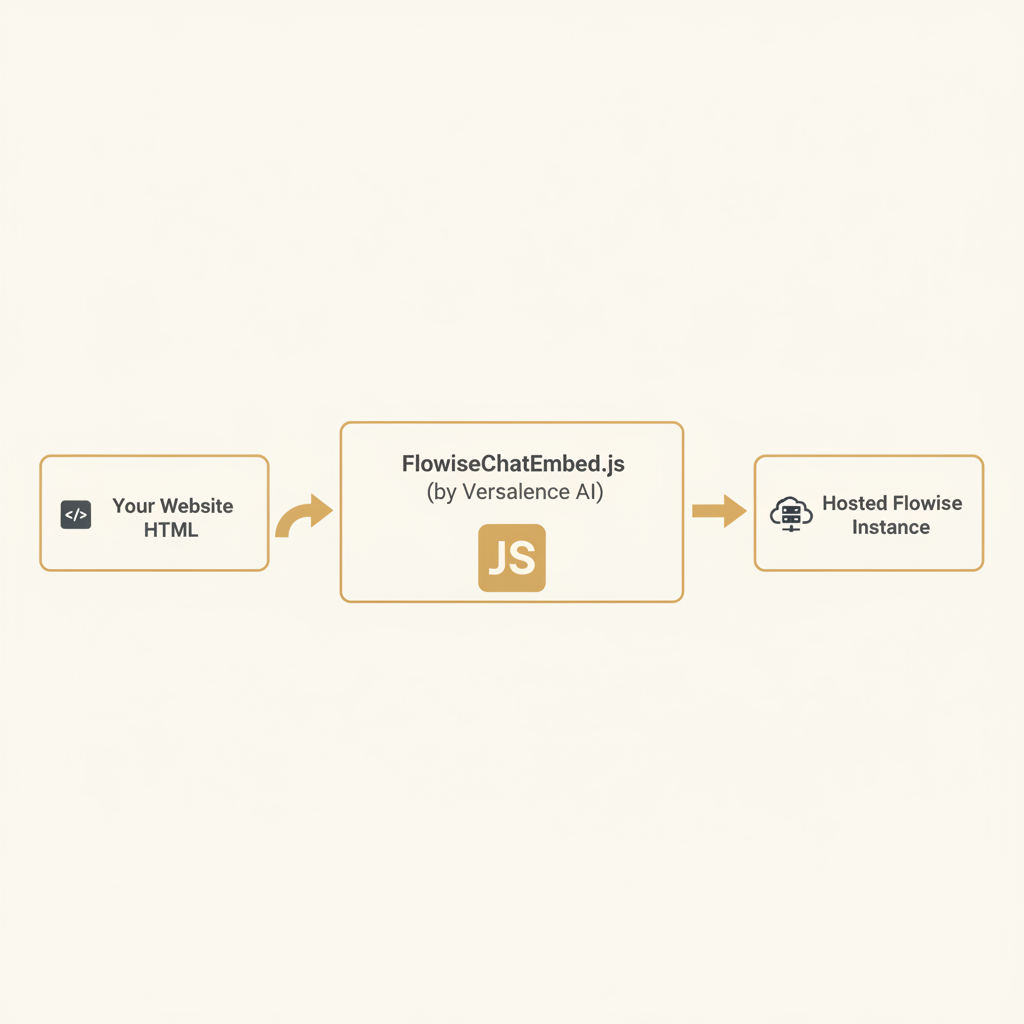
What if you could bypass all of that? What if you could deploy a powerful, custom-trained AI chatbot onto your website with just a few lines of code, all in the time it takes to drink a cup of coffee? At Versalence AI, we believe powerful AI should be accessible, not locked behind a wall of technical complexity. That’s why we created FlowiseChatEmbed, a lightweight, open-source solution that makes integrating a sophisticated Flowise-powered chatbot as simple as copying and pasting a script.
The Business Impact of Instant, Intelligent Engagement
Before we dive into the "how," let's solidify the "why." Integrating an AI chatbot isn't just a tech upgrade; it's a strategic business decision that delivers measurable returns across your entire operation. The value proposition goes far beyond simply having a chat bubble in the corner of your screen.
1. Drastically Reduce Customer Support Costs: According to IBM, AI chatbots can cut business operational costs by up to 30%. They act as your first line of defense, handling the vast majority of repetitive, tier-1 inquiries—questions about shipping, password resets, product features, or store hours. This automated deflection frees up your human support agents to focus on high-value, complex problems that require empathy and critical thinking, improving both employee and customer satisfaction.
2. Supercharge Lead Generation and Qualification: Your website traffic is a river of potential leads. A passive website lets most of that river flow by. An active AI chatbot acts as a net. It can proactively engage visitors, ask targeted qualifying questions (“Are you a small business or an enterprise?” “What’s your primary use case?”), and capture contact information, turning anonymous visitors into qualified leads for your sales team.
3. Boost Conversion Rates and Sales: How many sales are lost because a visitor had a simple question but couldn't find the answer? A chatbot trained on your product documentation and knowledge base can act as a personal shopper or a sales assistant. It can answer pre-sale questions, compare product specifications, and guide users directly to the checkout page, overcoming the final hurdles to conversion.
4. Achieve Unprecedented Scalability: A human agent can handle one, maybe two, conversations at a time. An AI chatbot can handle thousands simultaneously without breaking a sweat. Whether you have a sudden traffic spike from a marketing campaign or experience seasonal demand, your AI assistant scales effortlessly, ensuring every single visitor receives immediate attention.
5. Gain Invaluable Customer Insights: Every conversation is a data point. By analyzing chat logs, you can uncover common customer pain points, identify gaps in your documentation, understand which product features are most confusing, and discover new market demands—all directly from the "voice" of your customer.
The challenge has never been the value of chatbots, but the accessibility of implementing them. This is the precise problem Flowise and our FlowiseChatEmbed solution are built to solve.

How Versalence AI Delivers the Solution: The Power of Flowise + FlowiseChatEmbed
To understand our solution, you first need to understand its foundation: Flowise.
Flowise is a remarkable open-source, low-code tool for building customized Large Language Model (LLM) applications. Think of it as a visual canvas where you can drag and drop different AI components—language models (like GPT-4), data loaders (for PDFs, websites, etc.), vector databases, and APIs—and connect them to create a powerful, logical "flow." This visual approach democratizes AI application development, allowing you to build a chatbot that can, for example, read your company's entire knowledge base and answer questions based only on that private data (a technique known as Retrieval-Augmented Generation, or RAG).
Flowise is brilliant at creating the chatbot's "brain." However, the final step—getting that brain connected to your website in a clean, user-friendly interface—can still be a hurdle. That's where Versalence AI's FlowiseChatEmbed comes in.
Our FlowiseChatEmbed is a simple yet powerful JavaScript library designed to be the "last mile" of your chatbot deployment. It takes the complex chat logic you built in Flowise and renders it as a beautiful, customizable, and responsive chat widget on any website, requiring virtually no backend setup on your part.
A Practical, Step-by-Step Integration Guide
Let's walk through just how easy it is. The traditional method would involve building a React component, managing state, handling API calls with fetch, and setting up WebSocket connections for real-time streaming. With FlowiseChatEmbed, you do none of that. You simply add a script tag to your HTML.
Step 1: Build Your Chatflow in Flowise
First, you need a Flowise instance running with your desired chatflow. A chatflow is the visual workflow you create that defines how your chatbot behaves. Once you save your chatflow, Flowise will provide you with a unique chatflowid. You'll also have the URL of your Flowise server, which is your apiHost.
Step 2: Choose Your Embedding Style
Our library supports two primary modes of display, catering to different use cases.
A) The Pop-Up Chatbot (The Classic Approach)
This is the familiar chat bubble that sits in the bottom-right corner of a website, ready to help but staying out of the way until needed. It's perfect for general support and lead generation on marketing sites, e-commerce stores, and SaaS applications.
To implement it, you add this snippet to your HTML file, preferably just before the closing </body> tag:
<script type="module">
  import Chatbot from 'https://cdn.jsdelivr.net/npm/flowise-embed/dist/web.js';

  Chatbot.init({
    chatflowid: 'YOUR_CHATFLOW_ID', // Replace with your actual chatflowid
    apiHost: 'https://your-flowise.versalence.ai', // Replace with your Flowise instance URL
  });
</script>
That’s it. You replace the two placeholder values, and a fully functional AI chatbot is now live on your site. There is no step three.

B) The Full-Page Chatbot
Sometimes, you need a more immersive chat experience. This is ideal for dedicated support portals, internal knowledge base tools, or interactive product demos. The full-page embed takes over the entire browser window, creating a focused, distraction-free conversational interface.
The implementation is just as simple. You use a slightly different initialization function and add a custom HTML element where you want the chatbot to appear.
<body style="margin: 0;"> <!-- Important for true full-screen -->

  <flowise-fullchatbot></flowise-fullchatbot>

  <script type="module">
    import Chatbot from 'https://cdn.jsdelivr.net/npm/flowise-embed/dist/web.js';

    Chatbot.initFull({
      chatflowid: 'YOUR_CHATFLOW_ID',
      apiHost: 'https://your-flowise.versalence.ai',
    });
  </script>

</body>
By adding <flowise-fullchatbot> to your <body> and calling Chatbot.initFull(), you transform an entire page into your AI assistant.
Deep Customization: Making the Chatbot Your Own
A generic chatbot feels disconnected from your brand. FlowiseChatEmbed was built with deep customization in mind, allowing you to tailor almost every visual aspect of the chat widget to match your website's look and feel perfectly. This is all done through a simple theme object in the initialization script.
Here’s an example of a heavily customized pop-up chatbot:
<script type="module">
  import Chatbot from 'https://cdn.jsdelivr.net/npm/flowise-embed/dist/web.js';

  Chatbot.init({
    chatflowid: 'YOUR_CHATFLOW_ID',
    apiHost: 'https://your-flowise.versalence.ai',
    theme: {
      chatWindow: {
        welcomeMessage: "Hello! I'm VersaBot, how can I help you today?",
        backgroundColor: "#ffffff",
        height: 600,
        width: 400,
        fontSize: 16,
        poweredByTextColor: "#303030",
        botMessage: {
          backgroundColor: "#f7f8ff",
          textColor: "#303030",
          chatflowid: 'YOUR_CHATFLOW_ID',
    apiHost: 'https://your-flowise.versalence.ai',
          avatarSrc: "https://your-site.com/bot-avatar.png",
        },
        userMessage: {
          backgroundColor: "#007bff",
          textColor: "#ffffff",
          avatarSrc: "https://your-site.com/user-avatar.png",
        },
        textInput: {
          placeholder: "Type your question here...",
          backgroundColor: "#ffffff",
          textColor: "#303030",
          sendButtonColor: "#007bff",
        }
      },
      button: {
        backgroundColor: "#007bff",
        right: 20,
        bottom: 20,
        size: "medium",
        iconColor: "white",
        customIconSrc: "https://your-site.com/chat-icon.svg",
      }
    }
  });
</script>
With this level of control, you can fine-tune colors, fonts, messages, avatars, and positioning to create a chatbot experience that feels native to your brand, not like a tacked-on third-party tool.

Beyond the Embed: Versalence AI's Full-Stack Expertise
FlowiseChatEmbed is a powerful tool for frontend integration, but the true intelligence of your chatbot lives in the Flowise backend. While our embed script is open-source and free for anyone to use, building a robust, secure, and truly helpful AI assistant often requires expertise beyond the front end. This is where Versalence AI’s broader services come into play.
-
Custom Chatflow and Agent Development: We go beyond simple Q&A. Our team can design and build complex, agentic workflows in Flowise. We can connect your chatbot to internal APIs, query your company’s SQL databases, create multi-step conversational processes, and integrate tools that allow the AI to take action on behalf of the user.
-
Managed Flowise Hosting and Deployment: Don't want to manage your own servers? We provide secure, scalable, and fully managed hosting for your Flowise instance. We handle the infrastructure, security, and maintenance so you can focus on building great conversational experiences.
-
Advanced RAG Pipeline Construction: The "secret sauce" of a great support chatbot is its knowledge. We specialize in building sophisticated Retrieval-Augmented Generation (RAG) pipelines. We take your unstructured data—be it PDFs, Word documents, website content, Notion pages, or Zendesk articles—and transform it into a highly efficient vector knowledge base that your chatbot can query in real-time to provide accurate, context-aware answers.
FlowiseChatEmbed is your gateway, but our team is here to help you build the entire superhighway of AI-powered communication.
The Measurable ROI of a Smarter, Faster Approach
By combining the low-code power of Flowise with the deployment simplicity of FlowiseChatEmbed, the return on investment becomes clear and immediate.
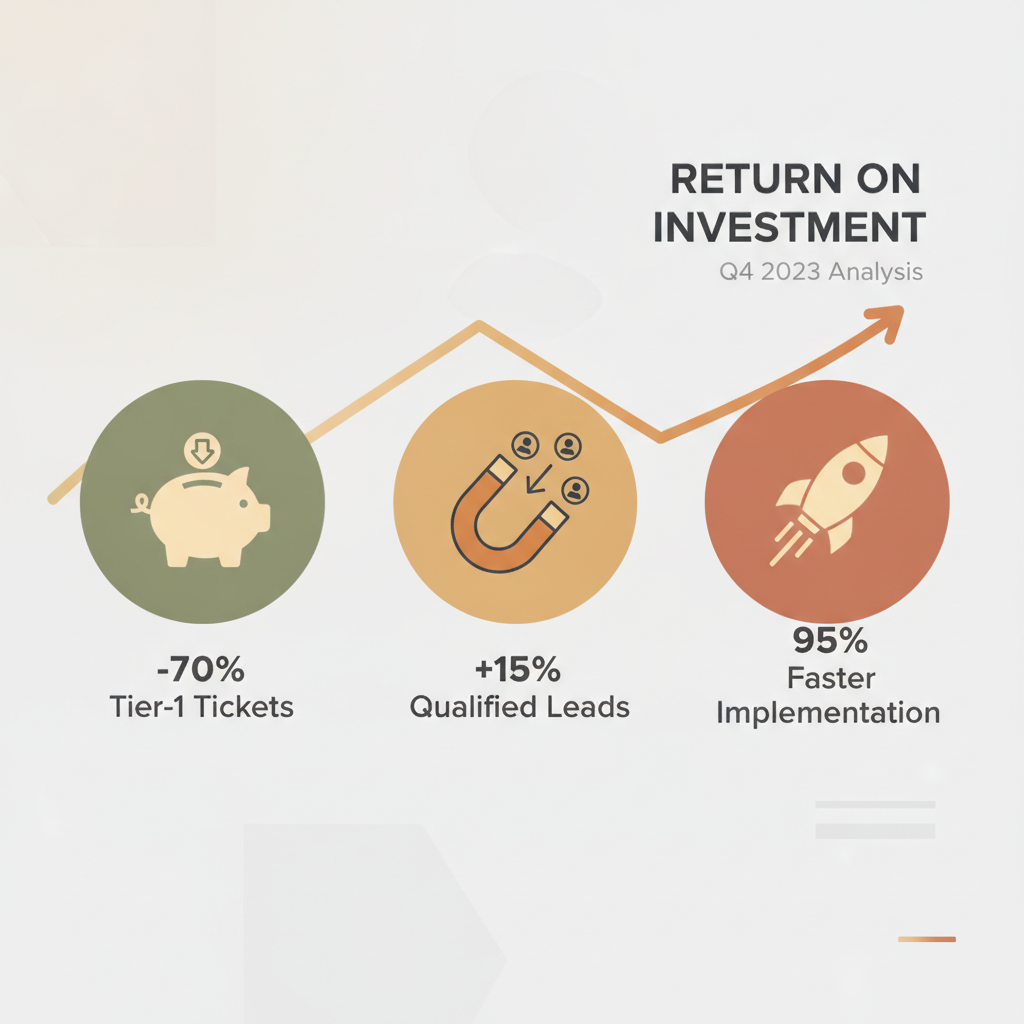
- Time-to-Market: What used to take a development team weeks or months can now be accomplished in a matter of hours. A proof-of-concept can be live on a staging site in under 30 minutes, allowing for rapid iteration and feedback. This represents a 95% reduction in implementation time.
- Support Ticket Deflection: A well-implemented RAG chatbot, trained on your support documentation, can successfully resolve 60-80% of tier-1 support inquiries without human intervention. This translates directly into lower operational costs and a more efficient support team.
- Lead Conversion Uplift: By proactively engaging every website visitor, our clients typically see a 10-20% increase in qualified leads captured through the website, directly impacting the sales pipeline.
- Developer Freedom: Your most valuable technical resources are freed from the mundane task of building and maintaining chat UIs. They can instead focus their efforts on your core product and business logic, where they can deliver the most value.
Get Started Today
The era of waiting for slow, complex, and expensive AI development cycles is over. The tools to build and deploy intelligent, brand-aligned chatbots are here, and they are more accessible than ever.
You can start your journey right now.
- Explore the Code: Visit our FlowiseChatEmbed GitHub repository to see the code, review the documentation, and get started on your own.
- Build Your Vision: If you have an idea for a custom chatbot but need the expertise to design the backend logic, manage the data pipelines, and deploy a production-grade solution, our team is ready to help.
Don’t let another potential customer leave your site with their questions unanswered.
Contact Versalence AI today or email our team directly at sales@versalence.ai to schedule a consultation and bring your intelligent assistant to life.
Work With Versalence
Ready to implement AI automation in your business? Our team builds custom solutions that deliver measurable results.
📧 Contact us
✉️ sales@versalence.ai